What is StringsAttached?

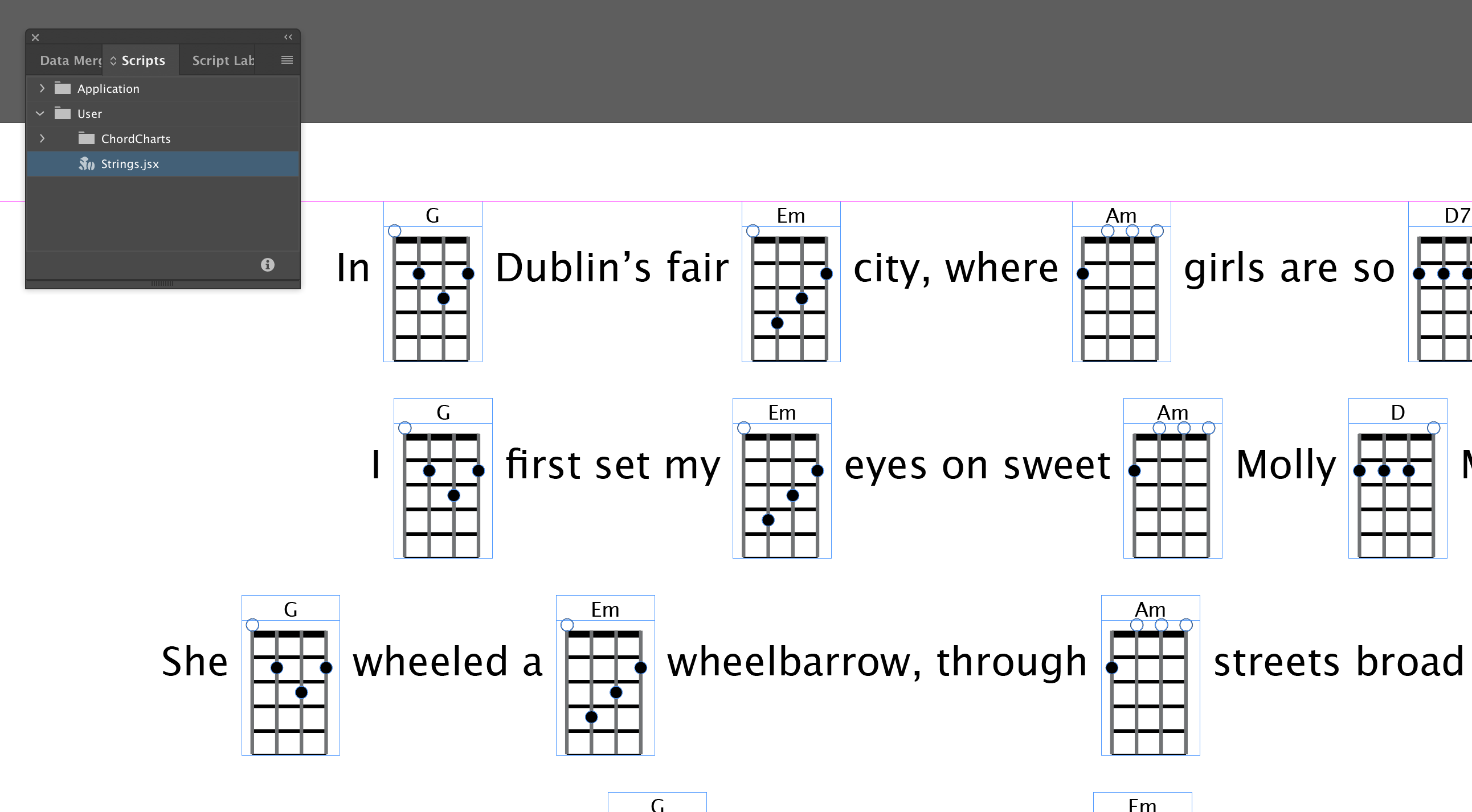
StringsAttached is a script for Adobe InDesign 2022 or higher; it can generate chord diagrams for 4- and 6-string instruments from the guitar family, like guitar, guitalele, ukulele, baritone ukulele,…
YouTube demo video: https://youtu.be/L6LmJDUhR5g
The script can be used to convert text-only chord sheets into sheets-with-diagrams.
It comes with a few example documents that can be used as starters for your own documents.
For beginners, the chord charts found on the internet are often difficult to use. The chord shapes are only shown at the top of the page, and the rest of the page contains just chord names and lyrics.
When you’re still learning the chords, it is often difficult to play off the page because you need to watch two separate areas of the page.
With StringsAttached, you get more freedom: you can either make chord sheets that have chord diagrams in-line with the lyrics (easier for beginners), or you can put the chord diagrams at the top of the page (easier for intermediate players).
The script also allows transpositions and chord diagram shifts.
These are handy if you want to play the songs a little bit lower or higher to match your vocal range, or if you want to print baritone ukulele charts instead of soprano ukulele charts.
Baritone ukuleles have a different tuning – they are tuned 5 half-steps down.
Same goes for guitaleles: they are like guitars, but tuned 5 half-steps up.
The way it works: the script will search all text in your currently opened InDesign document for chord names in parenthesis or square brackets.
Chord names in parenthesis, e.g. (C), (Dm), (Fmaj7), (Bbm7)… are replaced with chord diagrams.
Chord names in square brackets, e.g. [C], [Dm], [Fmaj7], [Bbm7]… are normally left alone, unless the transposition function is used.
When transposing the chord is replaced with another chord, as per the transposition, e.g. when transposing 2 steps up, [C] will become [D] and so on.
Installing StringsAttached
- Download PluginInstaller. If you’ve not done this before, download and install the free PluginInstaller from PluginInstaller.com. Make sure you have build #558 or higher installed (the build number is shown in the lower right-hand corner of the PluginInstaller windows).
- Create an Account. If this is your first time using PluginInstaller, you’ll need to create a new account and register it within PluginInstaller. Make sure to click the confirmation link in the registration email!
- Add a StringsAttached Bookmark. Add a bookmark for StringsAttached into PluginInstaller by clicking the following link: Add StringsAttached Bookmark into PluginInstaller
- Alternatively, you can use the Browse the Store for Software window in PluginInstaller and find the StringsAttached bookmark in the Rorohiko Catalog.
- Download and Install. Once the bookmark is listed in the Installing and Ordering window, select it and click the Download button. After the download, choose your InDesign version from the Install Target dropdown menu and click the Install button. StringsAttached will appear in the InDesign Scripts panel under the User section
Running
Run the script Copy Sample Files with Documentation to Desktop by double-clicking it on the Scripts panel.
This will copy a set of four sample documents to your desktop, and it will open one of the sample documents.
These documents are meant as ‘starters’ for your own chord sheets and scores.
You can adjust them and tweak their styling as desired.
On the pasteboard of these documents you will also find some documentation and configuration info.
The script is configured by way of a text frame on the pasteboard.
You can pick the instrument: Ukulele (4 string gCEA tuning) or Guitar (6 string EADGBe tuning).
There is more info on the pasteboard of the sample documents.
 Now run the StringsAttached.jsx script by double clicking it on the Scripts panel in InDesign.

Version history
Version 2.0.2: June 26, 2024
- Turn off screen redraw to speed it up on Windows
- Updated to CRDT_ES 0.1.2
Version 2.0.1: June 20, 2024
- Bug fixes
Version 2.0.0: June 16, 2024
- Converted to use PluginInstaller.