What does it do?

JSXGetURL enhances any Adobe Creative Cloud application that has ExtendScript support, to make it easy to access servers using http, https, sftp… from a script – e.g. to download assets from a remote server.
Sample Code
JSXGetURL works with InDesign, InDesign Server, InCopy, Illustrator, Photoshop… on Mac and Windows.
All you need to do is copy the whole JSXGetURL folder to sit alongside your own ExtendScript script, and then add an //@include line at the top of your script.
Sample code:
//@include "JSXGetURL/JSXGetURLLoader.jsx"
var getURL = JSXGetURL();

getURL.addRequestHeader("Accept: */*");
var s = getURL.get("https://www.rorohiko.com") + "";

alert(s.substr(0,1000));

var headers = getURL.getResponseHeaders();
alert(headers);

// Some random FTP file for testing

var f = new File("~/Desktop/sha512.sum");
var s = getURL.get("ftp://cygwin.com/pub/gcc/sha512.sum", f.fsName);

// Some zip file to test binary file download

var f = new File("~/Desktop/FrameReporter.1.1.8.zip");
getURL.get("https://www.rorohiko.com/downloads/FrameReporter.1.1.8.zip", f.fsName);
JSXGetURL is implemented as an ExtendScript DLL/framework, written in C/C++.
This version is only for desktop applications. We also have a version specifically for InDesign Server
We provide commercial training and developer support around JSXGetURL: if you need help integrating JSXGetURL into your custom solution, contact us at [email protected] to discuss training and support contracts.
Installing and Activating
- Download JSXGetURL
Download link: https://www.rorohiko.com/downloads/JSXGetURL.1.1.5.zip
To try it out before purchasing, unzip and run the sample.jsx script from your host app.
You can perform 5 network transfers after each fresh restart of the host app.
To activate and remove the transfer limit: activations cost US$ 49.oo per seat, and they last for a year. - Download and Install PluginInstaller.
If you’ve not done this before, download and install the free PluginInstaller from PluginInstaller.com. - Find JSXGetURL in the Available Software.
Select the Available Software option from the dropdown menu.
Type JSXGetURL into the search field. This should bring up two product options for JSXGetURL: one for InDesign desktop and one for InDesign Server.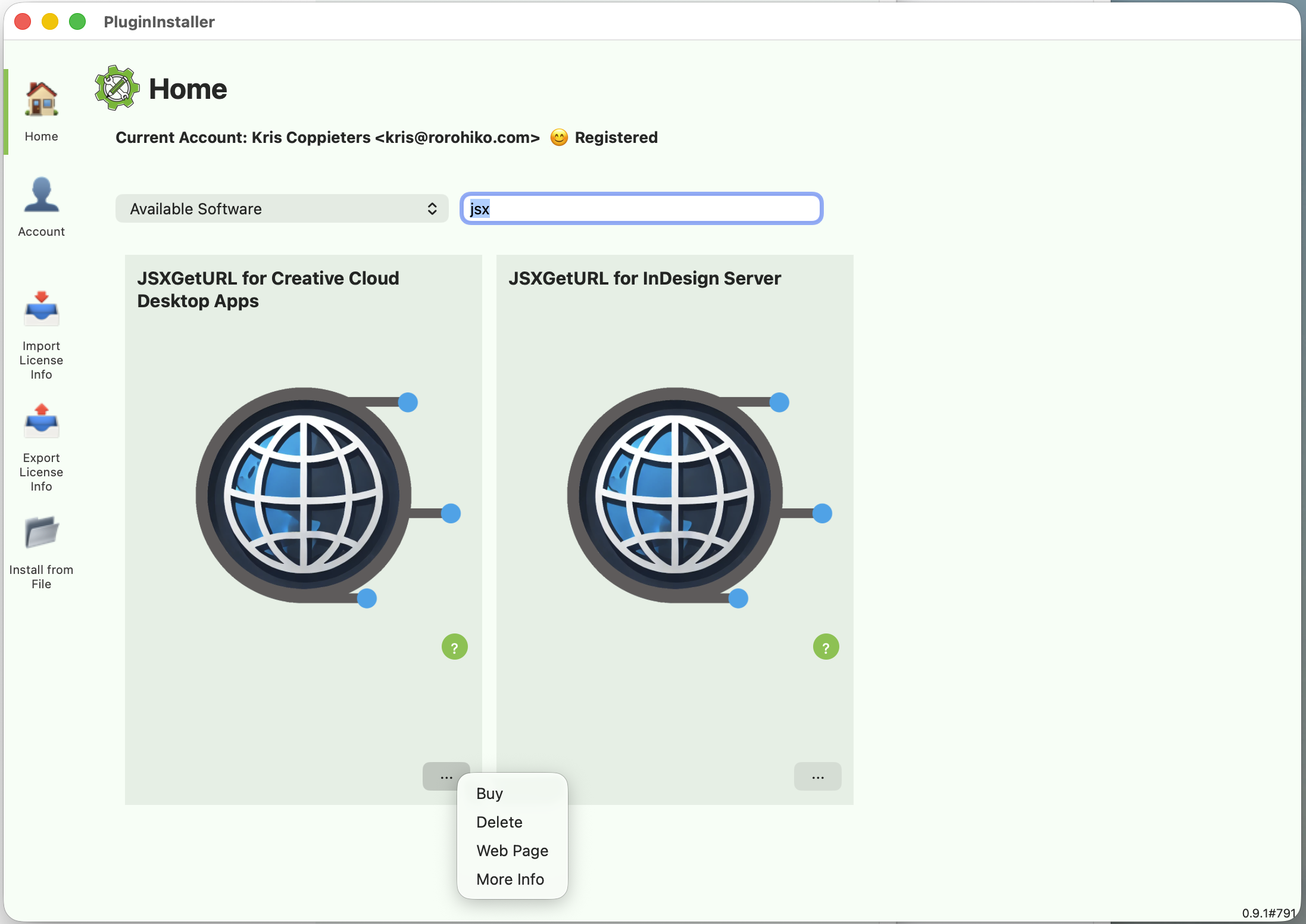
- Activate.
Select the Buy option in the … menu. Fill out the necessary details and click Purchase.
Issuing the activation can take some time, but in most cases it will be available in less than 30 minutes.
The 5-transfer limit will now be removed from JSXGetURL.
Demo
sample.jsx contains useful code samples (setting options, headers, POST vs. GET…). Please inspect it with a text editor for some useful hints.
Access sample.jsx (with the JSXGetURL folder alongside it) from your host app. E.g in InDesign, you can use the Scripts panel, in Photoshop, you can use the File – Scripts – Browse… menu and browse for sample.jsx, and so on…
Run sample.jsx from the host app.
Integrating JSXGetURL Into Your Script
Copy the JSXGetURL subfolder to reside next to your own script (.jsx). Look into sample.jsx file for example code.
Modify your script, and at the top, add a line
//@include "JSXGetURL/JSXGetURLLoader.jsx"Then set up your code by mimicking the code you see in sample.jsx, to perform the transfers you need.
Sublicensing/auto-activation
You might want to embed JSXGetURL into your own commercial software, or have JSXGetURL auto-activate so the end-user does not have to handle any activations.
To achieve this, you can embed activation info into your source code or you can work with a separate side-car file.
The embedded activation code ‘knows’ the seat count. If you want to auto-activate multiple systems from a single multi-seat license, you only need to generate a single embedded activation or an .actv file, and the same information will activate all the sub-licensed workstations. No need to make individual activation files for all sub-licensed workstations.
In addition to your standard account (incoming), you also need a separate developer account (outgoing).
The incoming order will be placed using a standard account, and the outgoing sub-license will be issued by a developer account.
First, switch the PluginInstaller to Standard mode via the File – PluginInstaller Mode menu. Purchase a license for JSXGetURL as documented in the previous section.
Once the order is validated and the activation file has been imported, switch the PluginInstaller to Developer/Publisher mode.
If you don’t have a developer account yet, create and register one. Wait for a confirmation email, and make sure to check your spam filter.
The account must be fully registered for this to work: you need to wait and not proceed until the developer account shows a ‘smiley face’ in the accounts window.

Once you have a registered developer account, go to the Sublicensing window, and select the order.
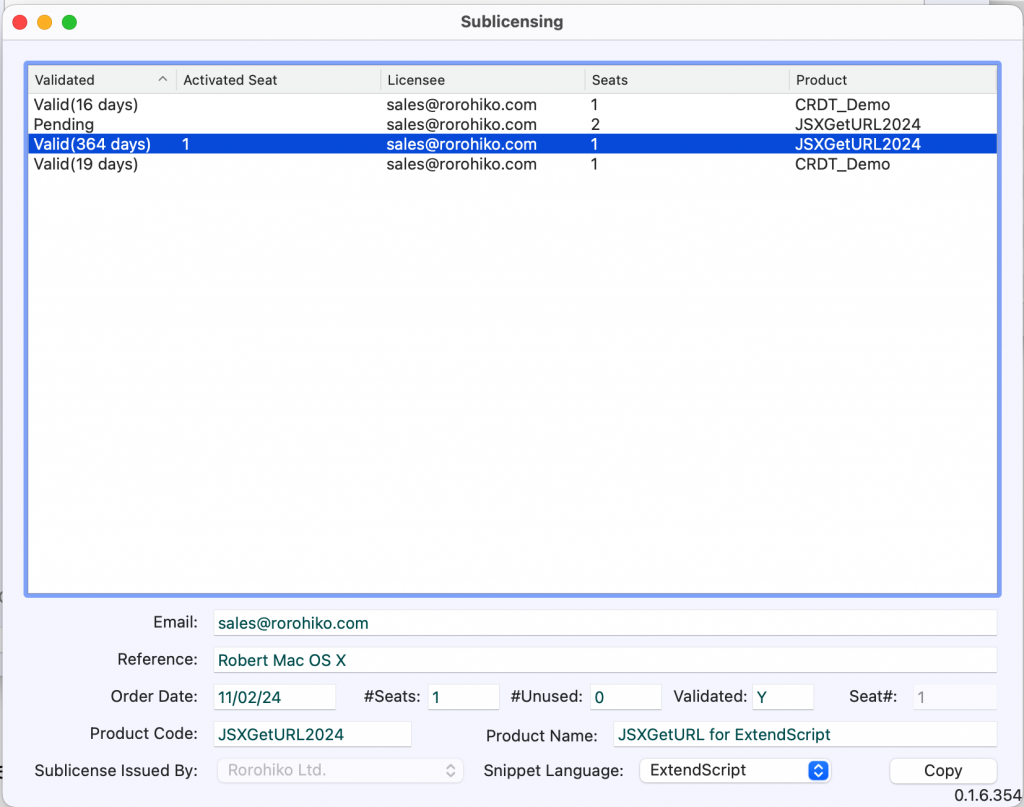
Option 1: Embedding
Click the Copy button and then go to your source code, and Paste right after the line in your own source code where you load JSXGetURL:
var getURL = JSXGetURL();so it looks like
var getURL = JSXGetURL();

TIGHTENER.setIssuer("1186cb861234567377c49d7eade","[email protected]");
TIGHTENER.sublicense("hdjshsajdshajdkas..lotsofit...NEmgd0UGH28dbI1RK0GRig==");
The software will now auto-activate when your customer runs it and the user won’t have to deal with activations.
TIGHTENER.sublicense() returns a boolean – it will return false if the activation fails for some reason, so you can verify in code whether the activation succeeded or not.
Option 2: Sidecar File
Alternatively, you can also change the Snippet Language dropdown to JSON Sidecar.
Click Copy and paste this data into a text file which you then save into a file with an .actv file name extension. You can use any filename that is meaningful to you.
When you install your software, store this file on the user’s computer in the folder ~/Library/Application Support/net.tightener/Licensing/AutoActivations
or %APPDATA%\net.tightener\Licensing\AutoActivations
When you run your software, and invoke JSXGetURL, the activation will happen automatically.
Changing computers
When you need to activate on another computer you can transfer and re-use the same licensing info. Activations can be transferred over.
If you activate your copy of JSXGetURL by way of the PluginInstaller: you can export and import all your account and activation data between computers. Use the File – Export License Info… and File – Import License Info… to manage a transfer.
If you activate your copy by way of the sublicensing mechanism, then the activation will be transferred automatically.
Note that to avoid abuse, there is a limitation on how frequently you can re-activate: after you activate a seat on a particular computer, you need to wait at least 10 minutes before you can re-activate the same seat on another computer.
Version History
Version 1.1.5, 10-Jun-2024:
- Upgraded internal Tightener module to build 547.
- Now using payment processor with PluginInstaller – no more manual payment handling.
Version 1.1.4, 25-Apr-2024:
- Can now set various CURL options (e.g. to follow redirects).
- Upgraded dependencies: curl 8.7.1, OpenSSL 3.3.0, zlib 1.3.1
Version 1.1.3, 31-Mar-2024:
- No changes to JSXGetURL. Unbundle PluginInstaller to avoid having to update JSXGetURL with each new PluginInstaller version.
Version 1.1.2, 26-Mar-2024:
- No changes to JSXGetURL itself. Improvements to the bundled PluginInstaller.
Version 1.1.1, 22-Mar-2024:
- No changes to JSXGetURL itself. License Manager renamed to PluginInstaller.
Version 1.1.0, 16-Mar-2024:
- License Manager now handles dark mode.
- Fixed a bug with sublicensing/autoactivation on machines that do not have License Manager installed.
Version 1.0.9, 7-Mar-2024:
- Fixed bug in sub-licensing feature: sub-licensed workstations did not always activate, even with a valid
.actvfile orTIGHTENER....code snippet. - The License Manager is the same as with version 1.0.8 – dark mode problems have not been fixed yet.
Version 1.0.8, 26-Feb-2024:
- Improved License Manager
Version 1.0.7, 21-Feb-2024:
- Fixed an issue with License Manager unable to activate
Version 1.0.6, 20-Feb-2024:
- Fixed an of issue with sublicensing using sidecar files
Version 1.0.5, 19-Feb-2024:
- Fixed a number of issues with sub-licensing and sidecar activation files.