for use with Adobe® InDesign® 2026 or higher.

What is StringsAttached?
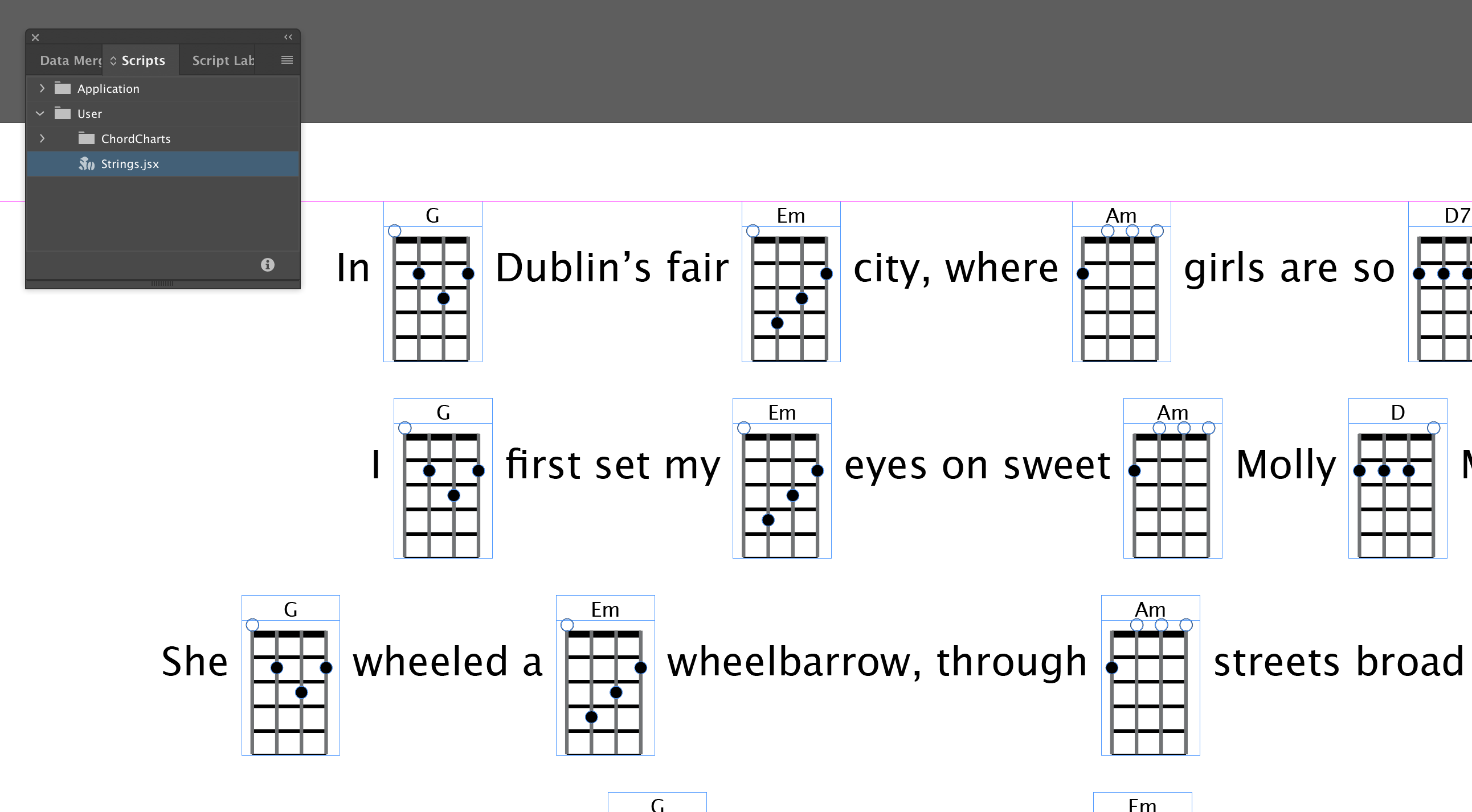
StringsAttached PL is a script for Adobe InDesign; it can generate chord diagrams for 4- and 6-string instruments from the guitar family, like guitar, guitalele, ukulele, baritone ukulele,…
YouTube demo video: https://youtu.be/L6LmJDUhR5g
The script can be used to convert text-only chord sheets into sheets-with-diagrams.
It comes with a few example documents that can be used as starters for your own documents.
StringsAttached PL is free and fully functional. When you run the script, it occasionally shows a donation reminder dialog. To donate, find StringsAttached PL in PluginInstaller’s Available Software list and use its donation option.
For beginners, the chord charts found on the internet are often difficult to use. The chord shapes are only shown at the top of the page, and the rest of the page contains just chord names and lyrics.
When you’re still learning the chords, it is often difficult to play off the page because you need to watch two separate areas of the page.
With StringsAttached, you get more freedom: you can either make chord sheets that have chord diagrams in-line with the lyrics (easier for beginners), or you can put the chord diagrams at the top of the page (easier for intermediate players).
The script also allows transpositions and chord diagram shifts.
These are handy if you want to play the songs a little bit lower or higher to match your vocal range, or if you want to print baritone ukulele charts instead of soprano ukulele charts.
Baritone ukuleles have a different tuning – they are tuned 5 half-steps down.
Same goes for guitaleles: they are like guitars, but tuned 5 half-steps up.
The way it works: the script will search all text in your currently opened InDesign document for chord names in parenthesis or square brackets.
Chord names in parenthesis, e.g. (C), (Dm), (Fmaj7), (Bbm7)… are replaced with chord diagrams.
Chord names in square brackets, e.g. [C], [Dm], [Fmaj7], [Bbm7]… are normally left alone, unless the transposition function is used.
When transposing the chord is replaced with another chord, as per the transposition, e.g. when transposing 2 steps up, [C] will become [D] and so on.
Installing StringsAttached PL
- Download, install and start PluginInstaller. Close InDesign. Clicking the following link will trigger PluginInstaller.
- Click this link to fetch StringsAttached PL: StringsAttached PL. Then click the Install… button, or click the … button to see all install options.
- Restart InDesign.
PluginInstaller installs the files for you. StringsAttached.jsx and Copy Sample Files with Documentation to Desktop.jsx appear in the User section of the InDesign Scripts panel (Window → Utilities → Scripts).
Alternatively, you can install this software directly from PluginInstaller. Select Available Software, then scroll through the list and/or use the Search box to locate StringsAttached PL.
Running
Run the script Copy Sample Files with Documentation to Desktop by double-clicking it on the Scripts panel.
This will copy a set of four sample documents to your desktop, and it will open one of the sample documents.
These documents are meant as ‘starters’ for your own chord sheets and scores.
You can adjust them and tweak their styling as desired.
On the pasteboard of these documents you will also find some documentation and configuration info.
The script is configured by way of a text frame on the pasteboard.
You can pick the instrument: Ukulele (4 string gCEA tuning) or Guitar (6 string EADGBe tuning).
There is more info on the pasteboard of the sample documents.
 Now run the StringsAttached.jsx script by double clicking it on the Scripts panel in InDesign.

Version history
Version 2.0.5: October 20, 2026
- Bug fixes and packaging updates
Version 2.0.2: June 26, 2024
- Turn off screen redraw to speed it up on Windows
- Updated to CRDT_ES 0.1.2
Version 2.0.1: June 20, 2024
- Bug fixes
Version 2.0.0: June 16, 2024
- Converted to use PluginInstaller.