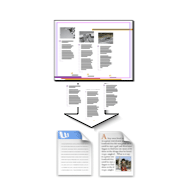
Export all the text in your InDesign document to a single file — no more copying and pasting from dozens of text frames.
Free 30-day trial. $29/computer/year after that.
-
— the free tool that installs and licenses TextExporter (and everything else in the Rorohiko catalog).
Already have it? Skip to step 2.
-
Click this link and when asked, allow PluginInstaller to process it:
Download TextExporter By Way Of PluginInstaller -
Restart InDesign. TextExporter is now under Window > Extensions > TextExporter.
That’s it — you’re in the trial. When you’re ready to buy, select TextExporter in PluginInstaller and click Manage Software > Buy.
Using It
Open your document, go to Window > Extensions > TextExporter, choose your options, click Export.
Three formats:
-
RTF — keeps formatting, opens in Word/Google Docs
-
InDesign Tagged Text — for reimporting with formatting intact
-
Plain Text — no formatting
Useful options: export by story or by frame, restrict to a page range, include/exclude footnotes and master pages, force text to black, preserve bullets/numbering.
Who It’s For
Translators, editors, and anyone who needs document text out of InDesign and into a word processor — for translation, review, or editing — without losing formatting or structure.
Requirements
InDesign 2024 or newer, Mac or Windows, PluginInstaller.
Need InDesign 2023 or earlier? Use TextExporter 4 instead (end-of-life, no longer supported).
Upgrading from TextExporter 4?
TextExporter 4 doesn’t work with InDesign 2025+. TextExporter 5 needs its own license — old activation codes don’t carry over.
Trouble?
-
Export button greyed out — save your document first (File > Save).